
Client and customer accounts For financial services and client onboarding teams
Every client account.
Onboarded, checked and in order.
FilePlan 365 gives every client their own secure file inside SharePoint, from onboarding and identity checks to account closure. Agreements, statements and correspondence are filed to the right client, with the right protection, automatically.
Works inside SharePoint
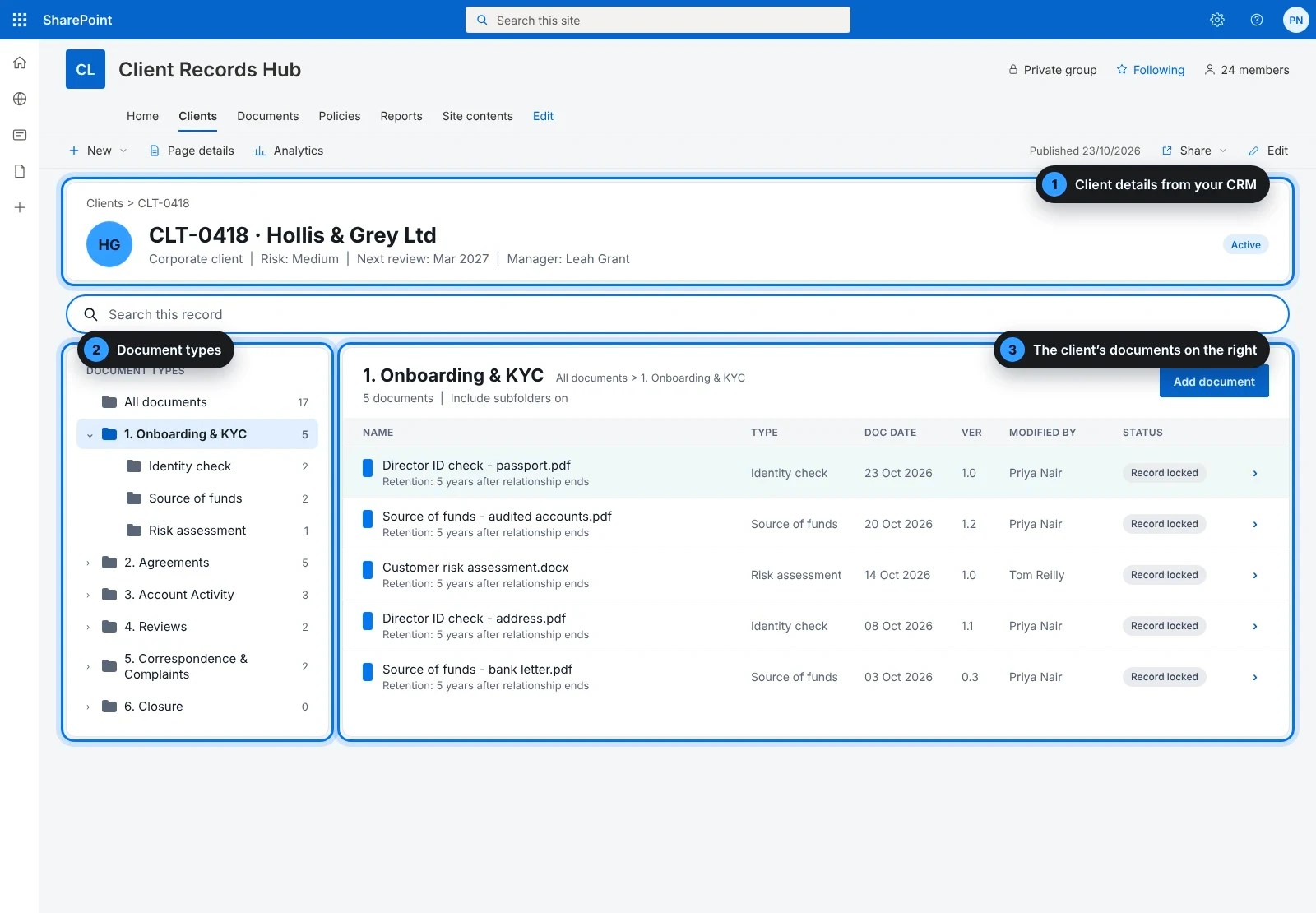
Client details from your CRM
30-day free trial
1
Client details
Client number, name, relationship manager and risk rating, taken from your CRM.
2
Document types
The same labelled folders for every client, down the left.
3
The client’s documents
Everything filed to that client, in the wider panel on the right.
What is FilePlan 365?
A digital filing cabinet, built into SharePoint
Think of a filing cabinet with a drawer for every client, and the same labelled folders inside each drawer. FilePlan 365 does exactly that inside SharePoint, the place your organisation already keeps its documents.
No new system to learn
Your team works in SharePoint and Microsoft 365, just as they do today. There is nothing extra to install on anyone’s computer.
Filed once, found in seconds
Every document goes into the right client file and folder, so anyone with access can find it straight away.
Kept as long as it should be
Each document is protected and kept for the right length of time, without anyone having to remember the rules.
Connected to your CRM
Client details arrive automatically
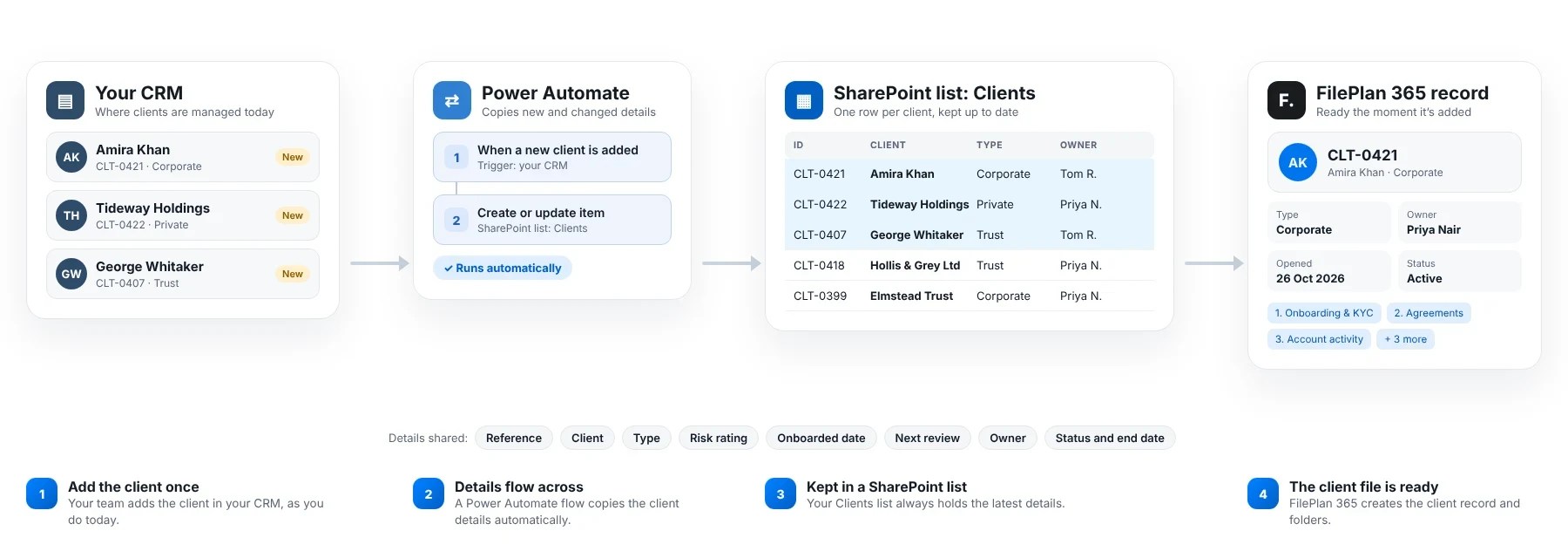
You never retype a client number, name or relationship manager. FilePlan 365 picks up each client’s details from your CRM, so a new client has a file ready before onboarding starts.
When a client changes
A new relationship manager, a change of address or a new risk rating is picked up automatically, so every file stays accurate.
When an account closes
The closure date flows across too, and the clock for how long the file is kept starts by itself.
For your IT team
A Power Automate flow keeps a SharePoint list of clients up to date from your CRM. FilePlan 365 reads that list. No custom code, and it stays inside your Microsoft 365 tenant.
The client file plan
Every client organised the same way
Each client file has the same six folders, so everyone knows where a document belongs and where to find it.
1
Onboarding and KYC
Application, ID and address checks, source of funds
Kept for: 5 years after relationship ends
2
Agreements
Terms of business, mandates, signed agreements
Kept for: 6 years after relationship ends
3
Account activity
Statements, transaction reports, instructions
Kept for: 6 years after relationship ends
4
Reviews
Periodic KYC reviews, suitability reports
Kept for: 5 years after relationship ends
5
Correspondence and complaints
Letters, emails, complaints and responses
Kept for: 6 years after relationship ends
6
Closure
Closure request, final statement, confirmation
Kept for: 6 years after relationship ends
Retention periods are examples. You can match them to your own retention schedule.
Templates
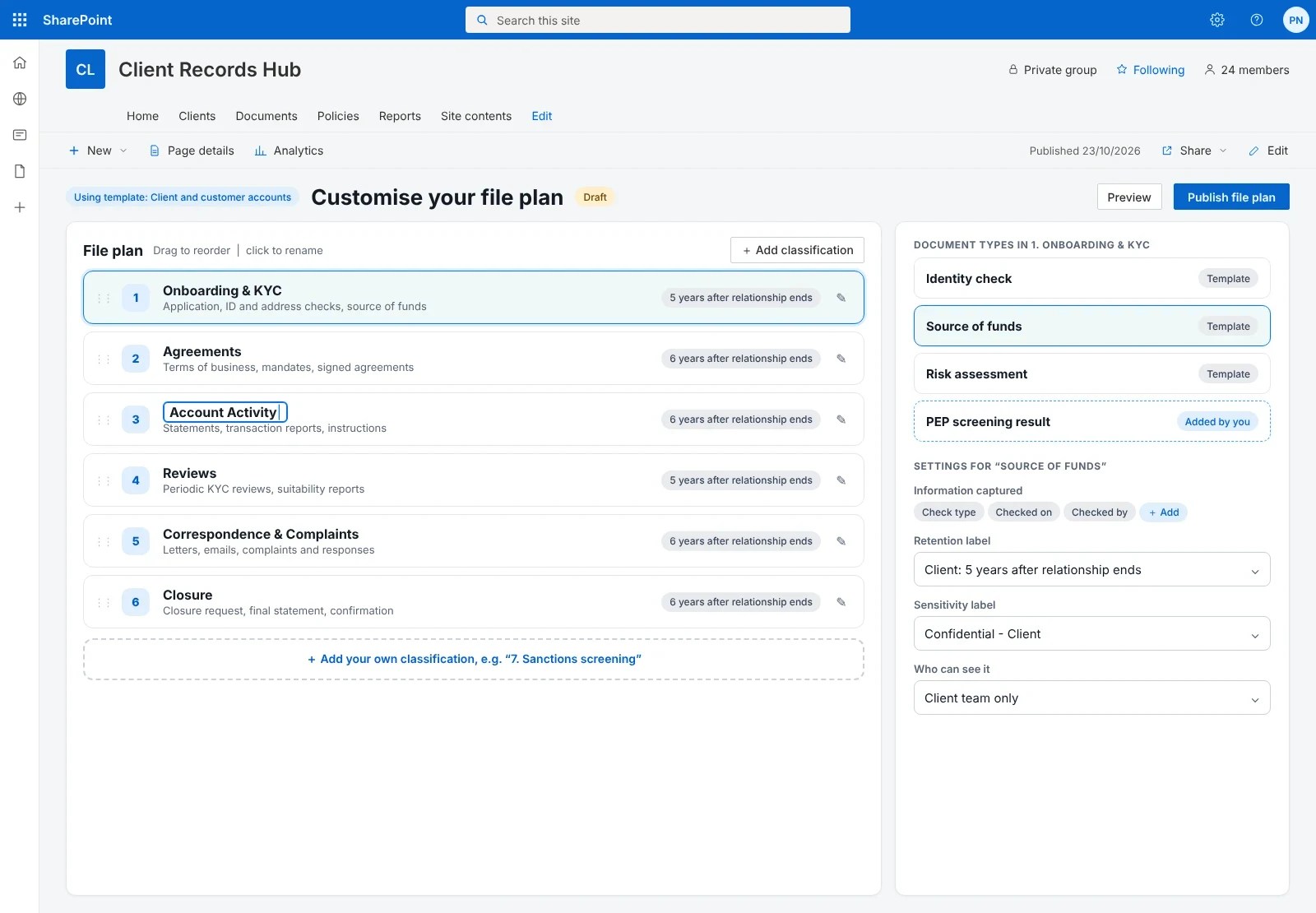
Start with our Client and customer accounts template. Make it your own.
You don’t have to design a filing system from scratch. The ready-made Client and customer accounts template gives you the folders, document types and protection settings above in a few clicks. Then change anything you like.
1
Choose the Client and customer accounts template
Pick “Client and customer accounts” from the template gallery when you set up FilePlan 365.
2
Use it straight away
Your client files, folders and document types are created for you, ready to start filing.
3
Make it your own
Rename folders, add your own document types, and set how long each is kept, to match your money laundering and records policies.

Find a client
Any client file in seconds
Start typing and FilePlan 365 shows matching clients straight away. No more hunting through folders or asking a colleague where something was saved.
1
Type a few letters
Search by client number, name or relationship manager.
2
Narrow it down
Filter by client type, risk rating, status or manager if you need to.
3
Open the file
Click a client to see everything filed to it.
People only ever see the clients and documents they are allowed to see.
Advanced search
Answer questions across every client file
Tick a few options and FilePlan 365 finds every matching document across all your clients. Perfect for periodic reviews, regulator visits and subject access requests.

KYC refreshEvery high-risk client whose review is due this quarter
Regulator visitAll suitability reports for one adviser
Subject access requestEverything held about one client, in one list
Compliance, without the jargon
Protected and kept for the right time, automatically
FilePlan 365 uses the security and retention tools already in your Microsoft 365, known as Microsoft Purview. You decide the rules once, and they’re applied to every document.
Kept for the right time
Onboarding and KYC records are kept for five years after the relationship ends, in line with money laundering rules. Closure starts the clock automatically.
Only the right people can see it
Client documents are marked Confidential. Identity documents and source of funds evidence are marked Highly confidential.
Personal data stays inside
Documents containing passport numbers or bank details can’t be shared outside your organisation.
These are example settings. You choose the labels and timescales that match your own policies.
Why teams choose FilePlan 365
Less time on admin. More time with clients.
One file per client
Onboarding, agreements, reviews and correspondence, in one place.
Ready before onboarding
New clients arrive from your CRM with their file set up.
Reviews without the scramble
Find the latest KYC evidence for any client in seconds.
Closure handled for you
Retention starts automatically when an account closes.
Every client file.
Always in order.
Try the Client and customer accounts template free for 30 days, in your own Microsoft 365 tenant.
More solutions: Mortgage and loan files · Insurance policies and claims · Debt recovery and collections files · See all 48 solutions