
Data protection files For data protection officers and privacy teams
Every processing activity.
Assessed, documented and accountable.
FilePlan 365 gives every processing activity and system its own secure file inside SharePoint. DPIAs, records of processing, data sharing agreements and breach reports are filed to the right activity, with the right protection, automatically.
Works inside SharePoint
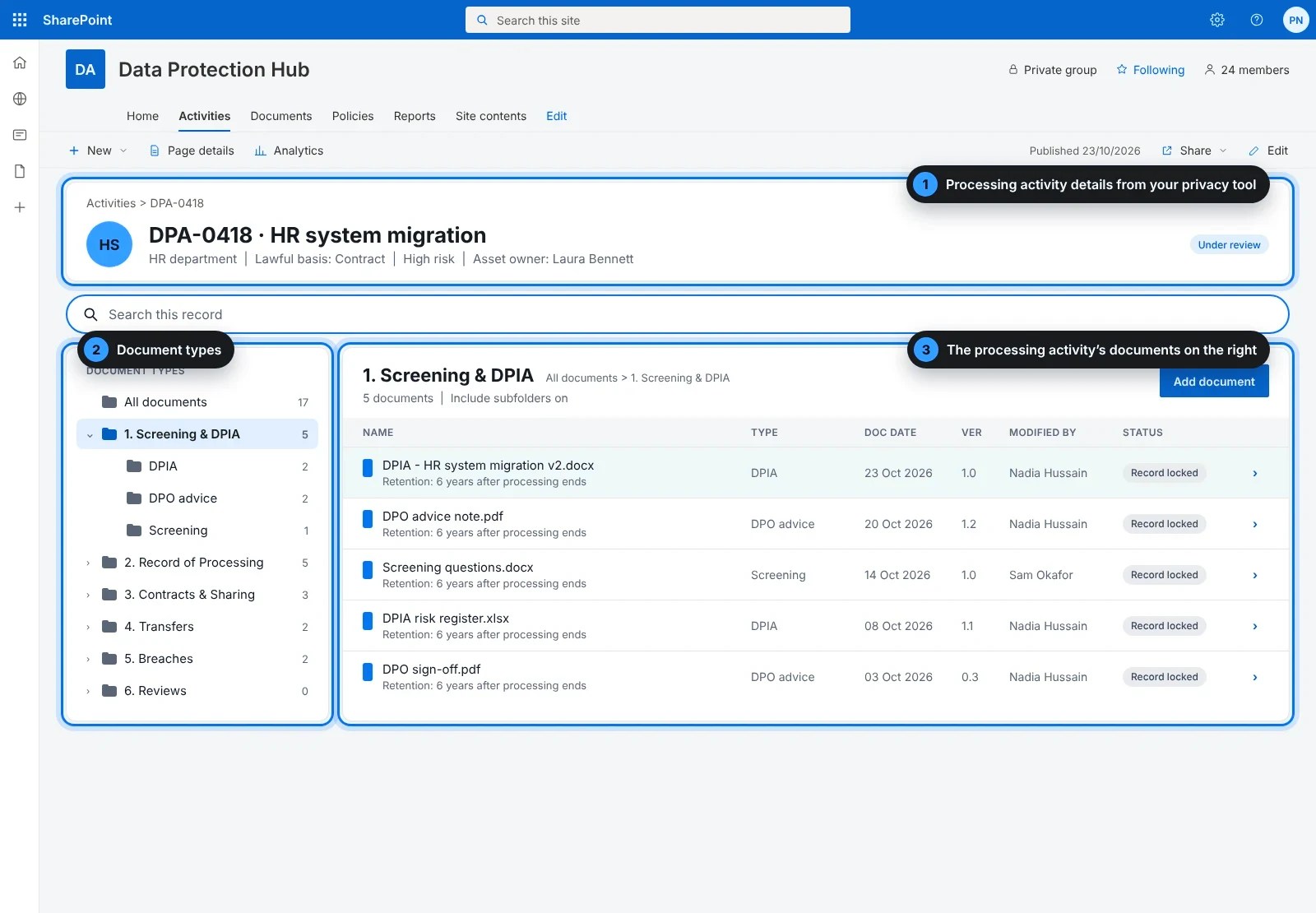
Processing activity details from your privacy tool
30-day free trial
1
Processing activity details
Activity reference, name, information asset owner and lawful basis, taken from your privacy management tool.
2
Document types
The same labelled folders for every processing activity, down the left.
3
The processing activity’s documents
Everything filed to that processing activity, in the wider panel on the right.
What is FilePlan 365?
A digital filing cabinet, built into SharePoint
Think of a filing cabinet with a drawer for every processing activity, and the same labelled folders inside each drawer. FilePlan 365 does exactly that inside SharePoint, the place your organisation already keeps its documents.
No new system to learn
Your team works in SharePoint and Microsoft 365, just as they do today. There is nothing extra to install on anyone’s computer.
Filed once, found in seconds
Every document goes into the right processing activity file and folder, so anyone with access can find it straight away.
Kept as long as it should be
Each document is protected and kept for the right length of time, without anyone having to remember the rules.
Connected to your privacy management tool
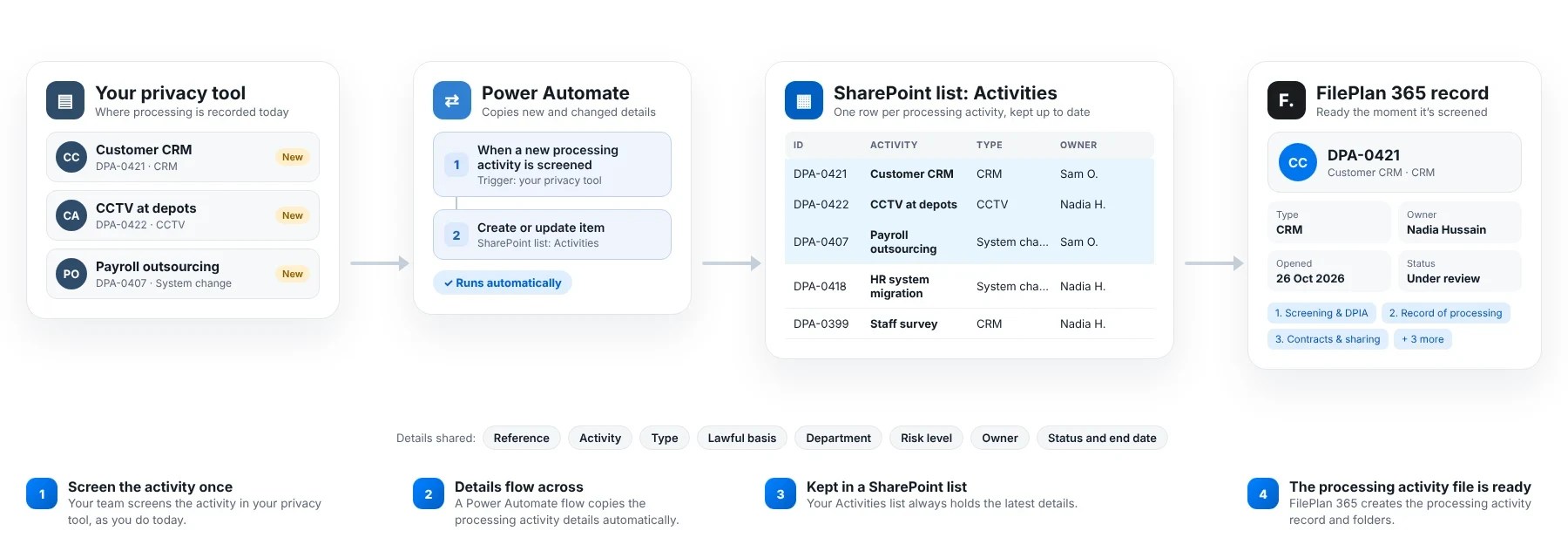
Processing activity details arrive automatically
You never retype an activity reference, system name or information asset owner. FilePlan 365 picks up each processing activity’s details from your privacy management tool, so every new project has a file ready from the first screening question.
When a processing activity changes
A new supplier, a change of lawful basis or a new data flow is picked up automatically, so every file stays accurate.
When processing stops
The end date flows across too, and the clock for how long the file is kept starts by itself.
For your IT team
A Power Automate flow keeps a SharePoint list of processing activities up to date from your privacy management tool. FilePlan 365 reads that list. No custom code, and it stays inside your Microsoft 365 tenant.
The data protection file plan
Every processing activity organised the same way
Each processing activity file has the same six folders, so everyone knows where a document belongs and where to find it.
1
Screening and DPIA
Screening, DPIA, DPO advice, sign-off
Kept for: 6 years after processing ends
2
Record of processing
ROPA entry, data map, retention
Kept for: 6 years after processing ends
3
Contracts and sharing
Processor contracts, data sharing agreements
Kept for: 6 years after processing ends
4
Transfers
Transfer risk assessments, IDTAs
Kept for: 6 years after processing ends
5
Breaches
Breach reports, ICO notifications, actions
Kept for: 6 years after closure
6
Reviews
Annual reviews, audit findings
Kept for: 6 years after processing ends
Retention periods are examples. You can match them to your own retention schedule.
Templates
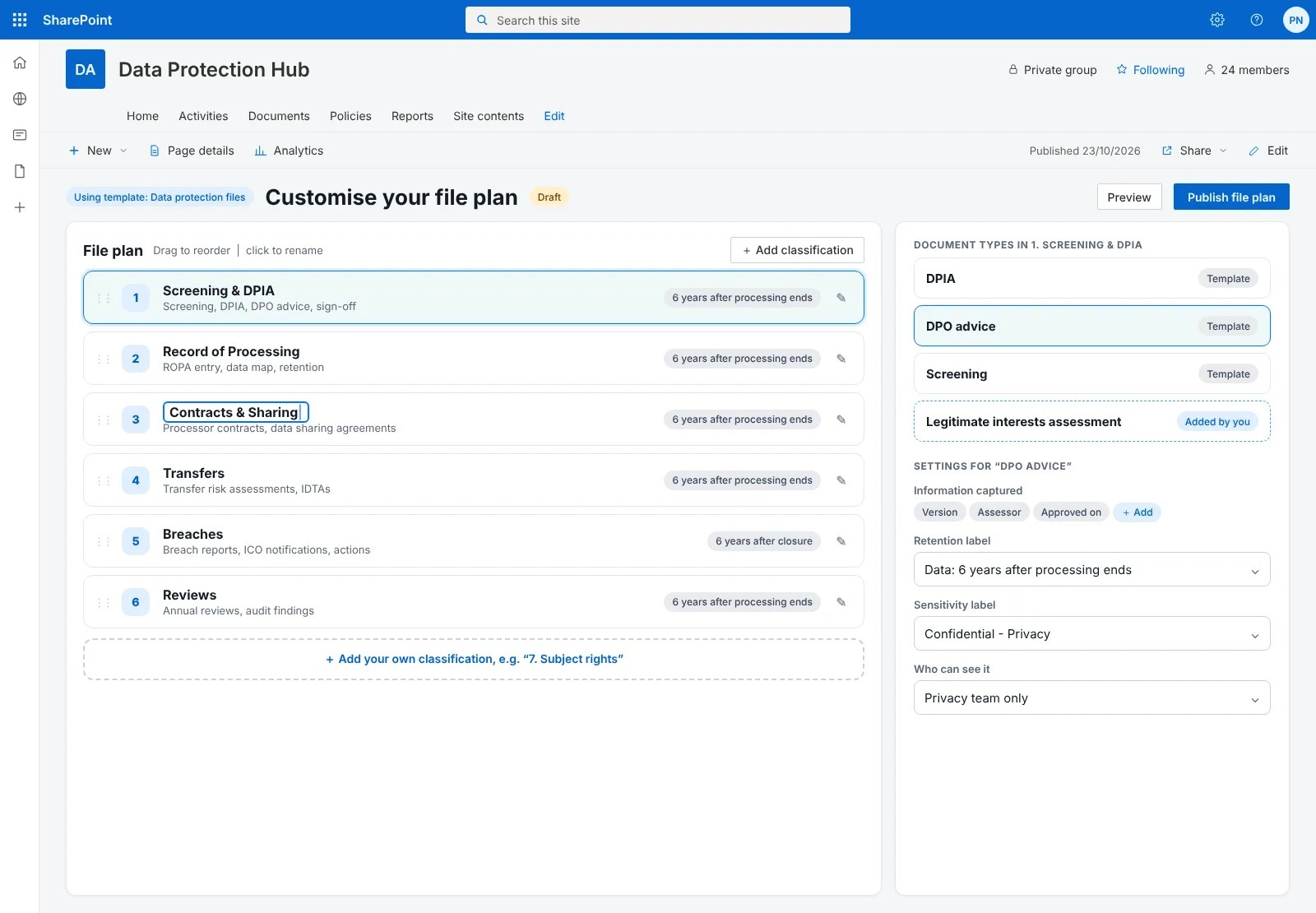
Start with our Data protection files template. Make it your own.
You don’t have to design a filing system from scratch. The ready-made Data protection files template gives you the folders, document types and protection settings above in a few clicks. Then change anything you like.
1
Choose the Data protection files template
Pick “Data protection files” from the template gallery when you set up FilePlan 365.
2
Use it straight away
Your processing activity files, folders and document types are created for you, ready to start filing.
3
Make it your own
Rename folders, add your own document types, and set how long each is kept, to match your data protection framework.

Find a processing activity
Any processing activity file in seconds
Start typing and FilePlan 365 shows matching processing activities straight away. No more hunting through folders or asking a colleague where something was saved.
1
Type a few letters
Search by activity reference, system or asset owner.
2
Narrow it down
Filter by department, risk level, lawful basis or status if you need to.
3
Open the file
Click a processing activity to see everything filed to it.
People only ever see the processing activities and documents they are allowed to see.
Advanced search
Answer questions across every processing activity file
Tick a few options and FilePlan 365 finds every matching document across all your processing activities. Perfect for ICO enquiries, audits and accountability reporting.

ICO enquiryEvery DPIA and breach report for one system
Internal auditAll data sharing agreements due for review
Board reportEvery high-risk processing activity and its controls
Compliance, without the jargon
Protected and kept for the right time, automatically
FilePlan 365 uses the security and retention tools already in your Microsoft 365, known as Microsoft Purview. You decide the rules once, and they’re applied to every document.
Kept for the right time
Data protection files are kept for six years after the processing stops. The end date starts the clock automatically.
Only the right people can see it
Privacy records are marked Confidential. Breach investigations are marked Highly confidential.
Sensitive details stay inside
Documents marked Highly confidential can’t be shared outside your organisation.
These are example settings. You choose the labels and timescales that match your own policies.
Why teams choose FilePlan 365
Less time chasing paperwork. More time protecting data.
One file per activity
DPIA, ROPA, contracts and breaches, in one place.
Ready at screening
New activities arrive from your privacy tool with their file set up.
Accountability on demand
Show the ICO your evidence in seconds.
Reviews kept on track
See which activities are due a review.
Every processing activity file.
Always in order.
Try the Data protection files template free for 30 days, in your own Microsoft 365 tenant.
More solutions: Board and committee files · Policy and controlled document files · Audit and inspection files · Health and safety incident files · Environmental permit files · See all 48 solutions