
SEND and EHCP files For SEND teams, local authorities and schools
Every EHCP.
On time and in one place.
FilePlan 365 gives every child or young person with special educational needs one secure file inside SharePoint. Requests, professional advice, plans and annual reviews are filed to the right young person, with the right protection, automatically.
Works inside SharePoint
EHCP details from your education system
30-day free trial

1
EHCP details
Child’s name, EHCP number, school and SEND officer, taken from your education case system.
2
Document types
The same labelled folders for every EHCP, down the left.
3
The EHCP’s documents
Everything filed to that EHCP, in the wider panel on the right.
What is FilePlan 365?
A digital filing cabinet, built into SharePoint
Think of a filing cabinet with a drawer for every EHCP, and the same labelled folders inside each drawer. FilePlan 365 does exactly that inside SharePoint, the place your organisation already keeps its documents.
No new system to learn
Your team works in SharePoint and Microsoft 365, just as they do today. There is nothing extra to install on anyone’s computer.
Filed once, found in seconds
Every document goes into the right EHCP file and folder, so anyone with access can find it straight away.
Kept as long as it should be
Each document is protected and kept for the right length of time, without anyone having to remember the rules.
Connected to your education case system
EHCP details arrive automatically
You never retype a child’s name, EHCP number or school. FilePlan 365 picks up each EHCP’s details from your education case system, so every request for assessment has a file ready the day it arrives.
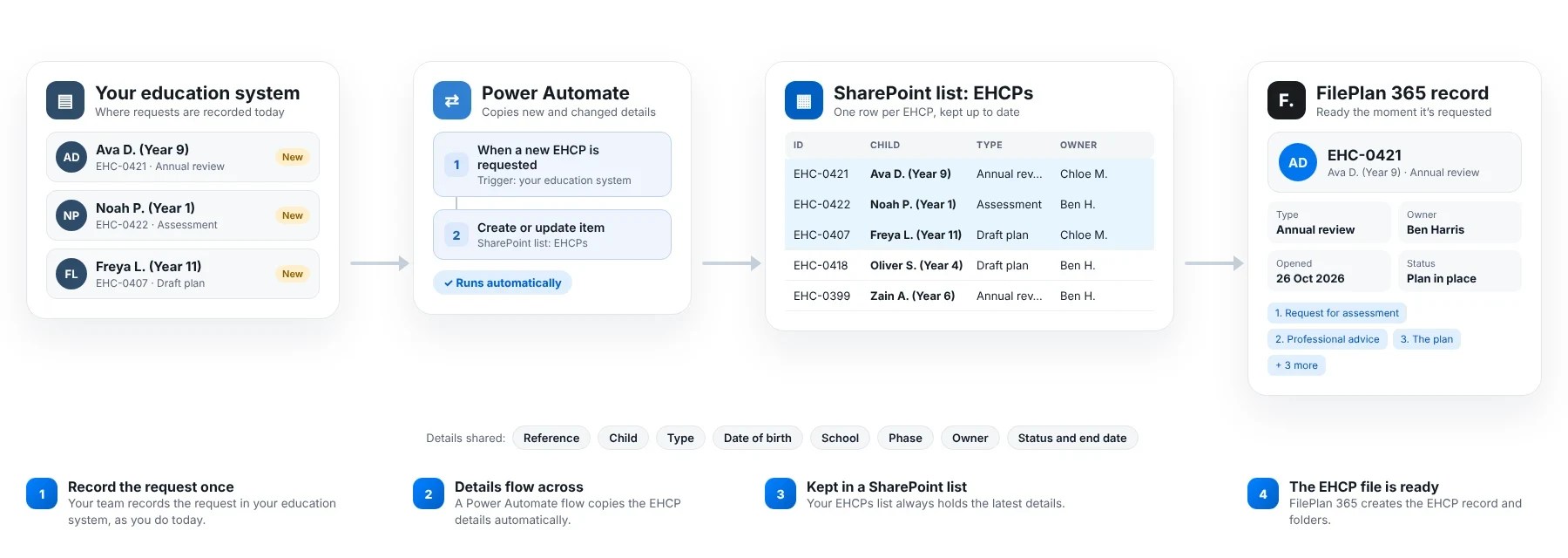
When an EHCP changes
A new school, a new SEND officer or a change to the plan is picked up automatically, so every file stays accurate.
When a plan ceases
The ceasing date flows across too, and the clock for how long the file is kept starts by itself.
For your IT team
A Power Automate flow keeps a SharePoint list of EHCPs up to date from your education case system. FilePlan 365 reads that list. No custom code, and it stays inside your Microsoft 365 tenant.
The EHCP file plan
Every EHCP organised the same way
Each EHCP file has the same six folders, so everyone knows where a document belongs and where to find it.
1
Request for assessment
Request, parental views, school evidence
Kept for: 35 years after date of birth
2
Professional advice
Educational psychology, health and social care advice
Kept for: 35 years after date of birth
3
The plan
Draft and final EHC plans, amendments
Kept for: 35 years after date of birth
4
Annual reviews
Review paperwork, outcomes, decisions
Kept for: 35 years after date of birth
5
Placements and funding
School consultations, placement decisions, top-up funding
Kept for: 35 years after date of birth
6
Mediation and tribunal
Mediation certificates, appeals, tribunal decisions
Kept for: 35 years after date of birth
Retention periods are examples. You can match them to your own retention schedule.
Templates
Start with our SEND and EHCP files template. Make it your own.
You don’t have to design a filing system from scratch. The ready-made SEND and EHCP files template gives you the folders, document types and protection settings above in a few clicks. Then change anything you like.
1
Choose the SEND and EHCP files template
Pick “SEND and EHCP files” from the template gallery when you set up FilePlan 365.
2
Use it straight away
Your EHCP files, folders and document types are created for you, ready to start filing.
3
Make it your own
Rename folders, add your own document types, and set how long each is kept, to match your local offer and statutory timescales.


Find an EHCP
Any EHCP file in seconds
Start typing and FilePlan 365 shows matching EHCPs straight away. No more hunting through folders or asking a colleague where something was saved.
1
Type a few letters
Search by child’s name, EHCP number or school.
2
Narrow it down
Filter by school, phase, status or SEND officer if you need to.
3
Open the file
Click an EHCP to see everything filed to it.
People only ever see the EHCPs and documents they are allowed to see.
Advanced search
Answer questions across every EHCP file
Tick a few options and FilePlan 365 finds every matching document across all your EHCPs. Perfect for 20-week deadlines, tribunals and Ofsted area SEND inspections.

20-week trackingEvery request with advice still outstanding
Tribunal bundleAll advice and plans for one young person
Area inspectionEvery annual review completed this term
Compliance, without the jargon
Protected and kept for the right time, automatically
FilePlan 365 uses the security and retention tools already in your Microsoft 365, known as Microsoft Purview. You decide the rules once, and they’re applied to every document.
Kept for the right time
SEND records are kept until the young person’s 35th birthday. Retention is applied automatically to every document.
Only the right people can see it
Every document is marked Highly confidential. Health and social care advice is restricted to the SEND team.
Children’s data stays inside
Documents containing health or personal details can’t be shared outside your organisation.
These are example settings. You choose the labels and timescales that match your own policies.
Why teams choose FilePlan 365
Less time chasing advice. More time meeting deadlines.
One file per young person
Request, advice, plan and reviews, in one place.
Ready on request
New requests arrive from your education system with their file set up.
Tribunals without the scramble
Pull together a full bundle in seconds.
Deadlines in view
See what’s outstanding against the 20-week timeline.
Every EHCP file.
Always in order.
Try the SEND and EHCP files template free for 30 days, in your own Microsoft 365 tenant.
More solutions: Student records · Children’s social care records · School admissions and appeals files · Patient and care records · Research and clinical trial files · See all 48 solutions